
Online Tee Time Reservation Instructions
RCSCW Tutorial - booking a tee time on the new member portal
- Login to the Sun City West Portal.
- Click on the "Tee Times" Tab on the top ribbon.
- Select the desired date of play.
- Select your Course(s).
- Select the number of Players.
- Select the desired time.
- Click Search

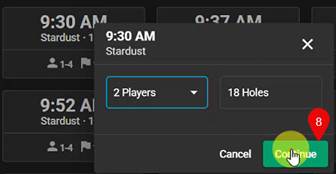
8. Select your Tee Time and confirm the number of players, Click Continue.
9. Whoever is logged into the portal will be in the first position on the tee time reservation.
10. To add the next player, select the drop-down arrow then click “Replace”
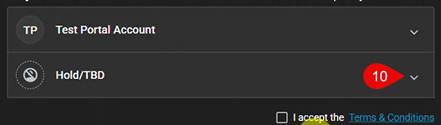
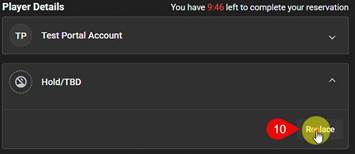
11. You will see a search popup appear from the center of the screen. Search for the player(s). We advise you to search using the player’s Member ID.
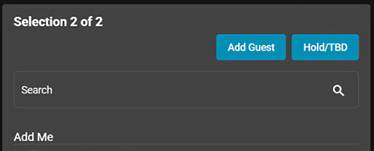
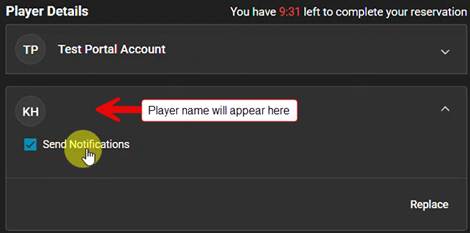
12. The selected player will appear in the Player Details area. You can choose to send an email notification by leaving the “Send Notifications” box checked, uncheck if you do not want to send an email notification.
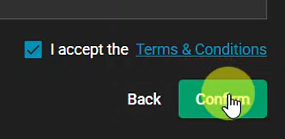
13. Accept the Terms & Conditions.
14. Click Confirm to confirm your Tee Time.
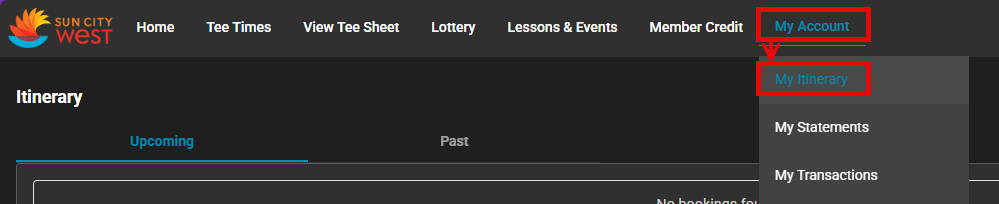
You can view your Upcoming Tee Time reservation(s) from the web portal by going to My Account > My Itinerary.
For more information please see our other FAQs or should you need further assistance, please submit a ticket - Click Here